Yep, unfortunately as @Luca says the menu title is used when displaying the menu on the menubar – i.e. it’s the File, Edit, etc. title.
The menu does provide a menu.addSection(<str>) method which might be what you’re looking for? But on macOS/Windows themes it is no different to a separator. The only way I can find to actually show it is using the Qt Fusion theme, e.g.
app = QApplication(sys.argv)
app.setStyle("Fusion")
Then using the following
self.fbMenu.addSection("A menu part")
…will give the following results in the menu…
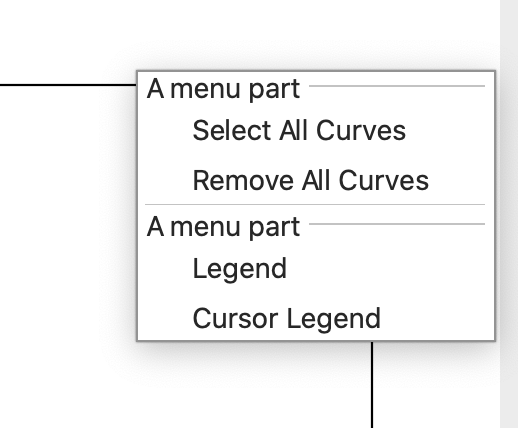
The Fusion theme is a cross-platform toolkit, so your app will look the same on all platforms. But it won’t look “native” on any.
One other option you have is to add a null QAction and disable it, e.g.
                a = self.fbMenu.addAction("A menu part")
                a.setDisabled(True)
This will show up how I suspect you’re expecting it to…
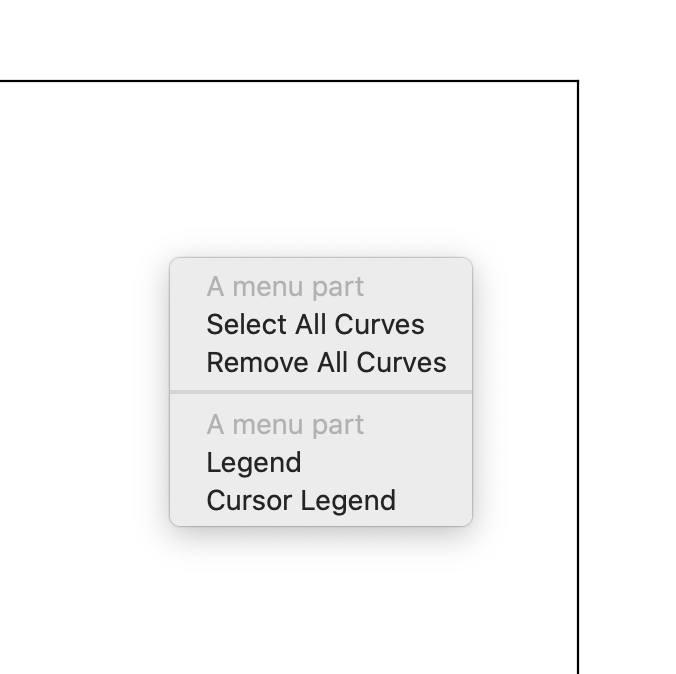
…but that’s potentially confusing for users if it looks otherwise like a disabled entry. I’ve not found a way to reliably theme individual menu items (e.g. so you could highlight this dummy entry in a different colour).